
A New Standard: The Academic Boardroom’s Spatial Campus

For the past two years, most of our thought process around extended reality has been confined to places where research usually takes place—decks, briefings, and PDFs given to institutional partners. Everything made sense when we discussed strategy, but that changed the moment we shifted our focus to spatial computing.
When one tries to present a document explaining the presence to someone who is expecting to be able to experience presence, a document is of little use. The description of the idea can be captured within three paragraphs, but we often lose the argument before we reach the second paragraph, since the argument only works if you are in it.
Therefore, we stopped thinking about how we should use the media to publish, and we began publishing in the media itself.
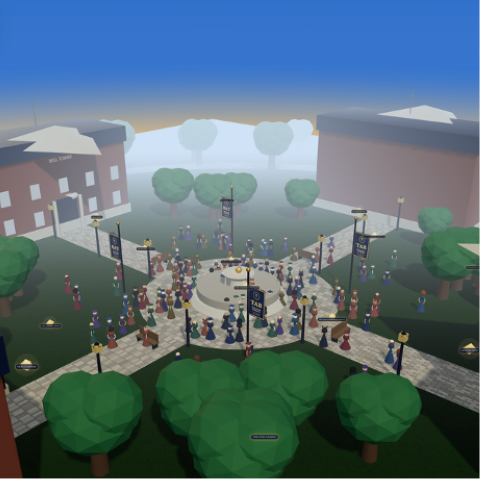
Today, we are launching the Spatial Computing Campus. This is a 3D quad-browser web-based environment that will hold our extended reality research, like any other department would be held by a university. The launch will be live today at the Spatial Computing Library (SCL) and will work in any current desktop or mobile browser and VR headsets. There is no installation process or app; you simply enter through a link.
A real spatial computing campus, not a demo
We created not so much a “product page” but instead a “place” to explore.
Within the quadrangle, there are 10 different visitor areas/sites of exploration: The Boardroom, The Studio, The Lounge, The Research Library, The Merchandise Outpost, and five other various locations featuring ongoing work in XR Framework, Spatial Audio, and 3D Asset Development. There are several different ways to move throughout the quadrangle—using the keyboard with “WASD” on a desktop or a touch joystick on a mobile—or you can sit back and take a fully automated tour of the quadrangle, walking from one side to the other. Regardless of the mode you choose, once you arrive at a zone, you can click on it to delve deeper into that specific zone-based topic.
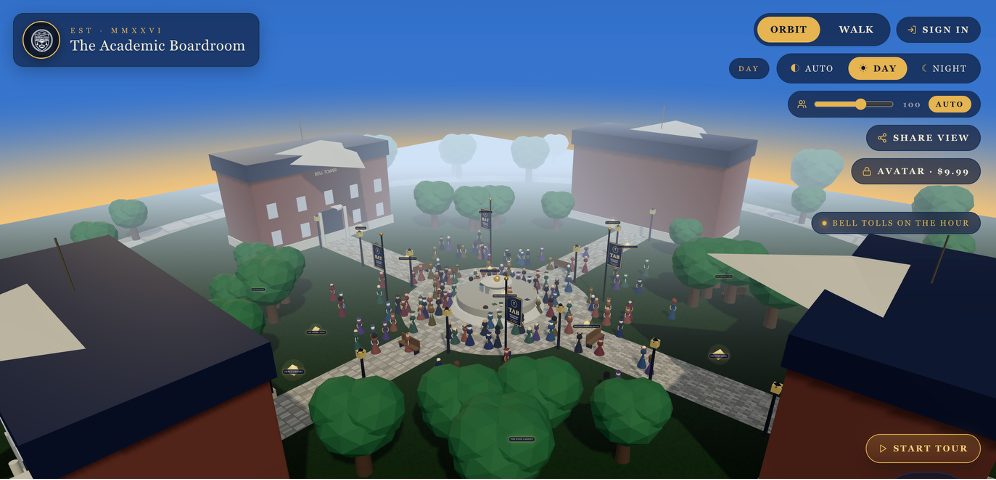
In the background of the quadrangle, we have created simulated students who are walking throughout the quadrangle during the exploration. This was intentional; it was a design decision to have students populate the environment since an empty spatial setting feels like a screensaver, while a populated one feels like an institution. Under the hood, we have created those students as instanced geometry, thereby allowing us to have approximately 150 of them visible at any one time without dropping frames on common hardware; therefore, lower-powered devices utilize a density control to lower this number.
The Lighting for the Campus also changes based on a live day/night cycle; therefore, a visit to our campus at 9 a.m. will appear completely different than the same visit at 9 p.m.
Everything you’d expect in a real quad — pathways, buildings, ambient life, a sense of where to go next — is there because presence collapses the moment any one of those pieces is missing.
You Do Not Have to Be a Spectator in This Environment
The most important element of this launch is not its architecture but rather how every visitor can be an active student.
When you enter our campus, you will be part of an immersive experience by providing us with a 2D headshot, and we will return to you a fully rigged 3D character model. You’ll be able to use this character on our campus, on your author pages, in Apple Vision Pro-compatible USDZ scenes, and in any other virtual environments that use the USDZ format. The first character models have already been created for Jeff Bennett, Dr. Paule Valery Joseph, Minda Harts, and me, and we will continue to build on the contributor directory from there.
By treating identity as a first-class citizen, as opposed to being treated as a ‘nice to have,’ we are creating a framework for engagement in spatial experiences. If a spatial experience is created without considering the identity of its users, then the spatial experience has very little value. You can create the best architecturally designed space in the world, but if a person walks in and is represented by a floating name tag, the experience will not resonate. Providing contributors with a digital version of themselves that can walk around the campus will create a significant difference between creating a demo of a tradition based on the originally designed space and creating an actual space where individuals will return multiple times.
What the TAB Spatial Computing Campus Represents
The Spatial Computing Sandbox (the research effort associated with the campus) has traditionally focused on three questions:
The first question relates to XR system design: How should authoring workflows work for the conversion of physical products into digital, and more specifically, how to design for things like spatial podcasting and defining custom sound for fully immersive spaces?
The second question relates to spatial asset optimization: when converting from 2D to 3D, how do you optimize character rigging, branded spaces, and the combined use of these assets so that institutions can maintain their identity during a 3D transition?
The third question relates to institutional change: What are the physical and ROI-related changes required to be able to see the use of immersive technologies at an enterprise or academic level versus an institutional pilot?
Therefore, all three of these questions have heretofore only existed as words on a page, but at this point, each of them now has a location on the campus where you can walk to them.
An open invitation
The campus courtyard is open for exploration! You can access the same link from all your devices (i.e., laptop, tablet, mobile phone, Meta Quest, or Vision Pro). Spatial computing will transform how academic and business organizations publish, deliver educational content, and bring people together. The best way to demonstrate this is to show you rather than tell you. By no longer using PowerPoint to make the assertion.
Come see us on the quad.